
A weekly check-in is the part of online coaching clients see most often. Done well, it tells you what to change before a small problem becomes a reason to stop. Done badly, it’s a form clients fill in out of duty until they don’t.
Below is a free check-in form for online personal trainers and nutrition coaches, as a printable PDF and an editable Word file, with a four-weekly review on the last page. The rest of this guide explains each question, how to reply and where to run it. Form tools and app features were checked on 11 November 2026.
01 / Download
A free weekly check-in form
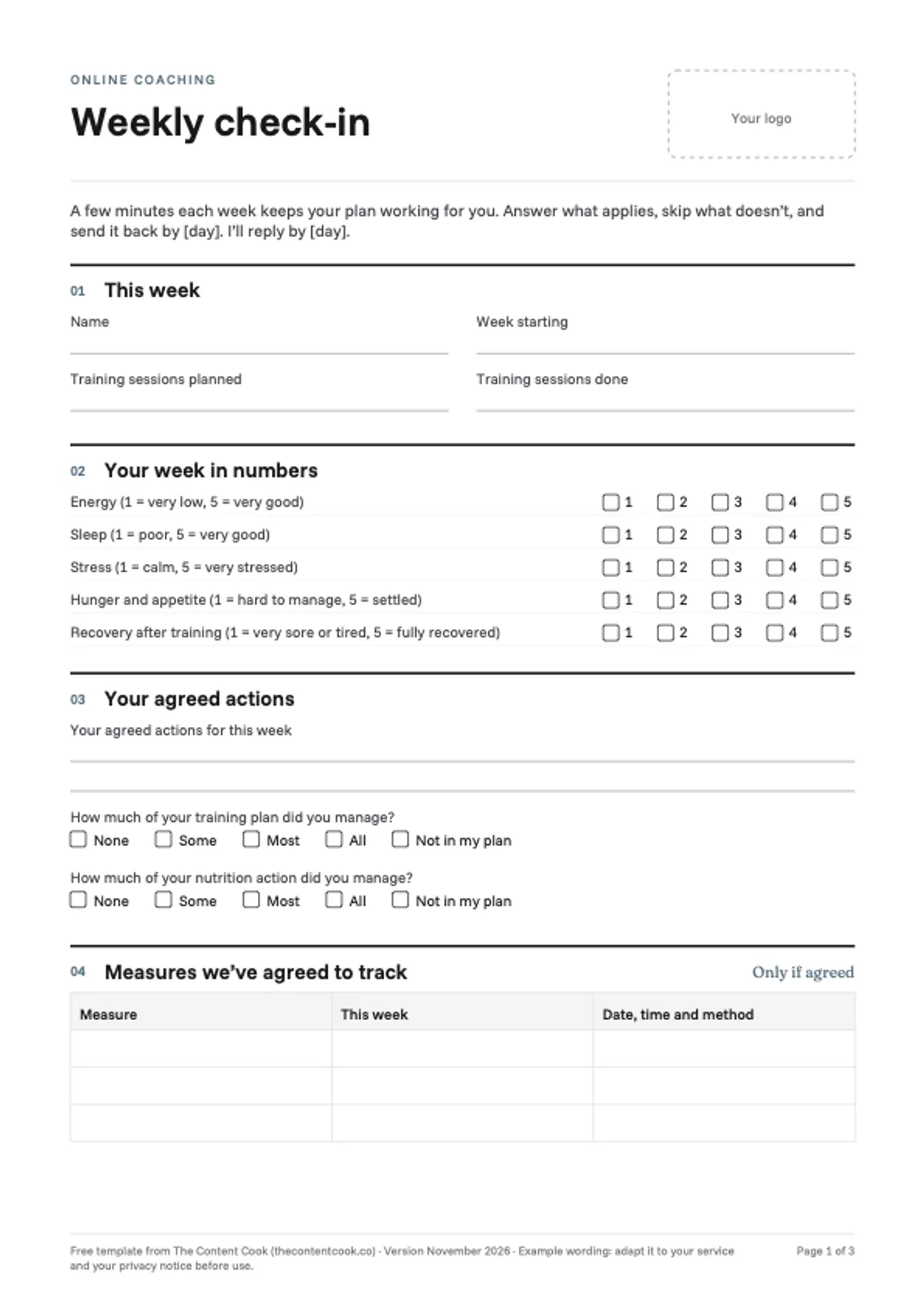
Weekly check-in and four-weekly review
Three A4 pages: a two-page weekly check-in with ratings, agreed actions, optional measures, five open questions and a reply box for you, then a one-page review for every fourth week. There’s space for your logo, and no sign-up is needed.
Use the Word file to add your logo, your check-in day and your reply time; it also opens in Google Docs. It works for training, nutrition or both: each action question has a “Not in my plan” box, or you can delete the line you don’t need. Free to use and adapt for your own clients. Please don’t resell it or offer it as your own template.
02 / Purpose
What a check-in is for
A check-in has three jobs. It shows you problems while they’re still small, it keeps the plan fitting the week the client actually had, and it builds a record you can both look back on. It isn’t a weekly test, and it works best when the client can see you use what they tell you.
The research supports the habit, with caveats. In a meta-analysis of 48 trials in adults with an average BMI of 30 or more, goal setting and self-monitoring were associated with changes in eating and activity, and feedback on the outcome of that behaviour with change that lasted 12 months or more. A systematic review of 22 weight-loss studies found a consistent link between self-monitoring and weight loss, while describing the evidence as weak because of how the studies were done. Both are associations, not proof that a form produces results; the useful part is the conversation it starts.
03 / Timing
How often, and when
Weekly is a good default for online clients, especially in the first months. For established clients who are progressing steadily, fortnightly can be enough, with the four-weekly review keeping the bigger picture in view.
Agree two things when the client starts: the day they’ll send it, and when you’ll reply. Our onboarding guide has example wording. Then keep to your side of it: a check-in that disappears without a reply teaches clients that it doesn’t matter.
04 / The questions
The questions, section by section
Each section earns its place by changing what you do next. If a question never does, take it out.
1. This week
Name, the week, and training sessions planned against sessions done.
What to do with it: the gap between planned and done tells you whether the plan fits the client’s life. If it’s short week after week, change the plan before you question the client’s commitment.
2. Your week in numbers
Five ratings from 1 to 5: energy, sleep, stress, hunger and appetite, and recovery after training.
What to do with it: look at the trend over several weeks rather than one score. A run of poor sleep or recovery often explains missed sessions, and a fall in energy can be worth a question before it becomes a lapse. Hunger that’s hard to manage is a prompt to talk about meals within your scope; our guide to what personal trainers can advise on nutrition sets out where that ends.
3. Your agreed actions
The actions you agreed for the week, then how much of the training plan and the nutrition action the client managed: None, Some, Most or All.
What to do with it: “Some” is information, not failure. If an action keeps coming back as “None”, make it smaller or swap it for one the client chooses.
4. Measures we’ve agreed to track
Only the measures agreed at the start, with the date, time and method of each.
What to do with it: compare like with like. Section 5 covers choosing measures.
5. In your words
Five open questions: what went well, what got in the way, anything coming up next week, anything they’d like to change, and a question for you.
What to do with it: this is usually the most useful part. Use the client’s own words in your reply, and plan around what’s coming up: a week of travel needs a different plan, not a missed check-in.
6. Progress photos
A line on how to send them, only if you’ve agreed photos and the client has consented.
7. Coach’s reply
For you: one thing to keep, one thing to adjust, any follow-up or referral, and the next check-in date. Section 6 covers writing the reply.
05 / Measures
Measurements and photos
Agree measures at the start rather than adding them to the form by default. Some clients find weighing themselves useful; for others it gets in the way, and strength, energy, sleep and how training feels can all show progress. The consultation form’s starting-point page is the place to agree them.
Progress photos need the client’s consent, and using them in your marketing needs separate consent: our getting-clients guide covers the rules on testimonials and before-and-after photos. Ask for the same light, position and time of day each time, and make it easy to stop.
06 / Replying
Replying to a check-in
Reply within the time you promised, and keep it short enough to act on:
- Refer to what they said. Quote or paraphrase something from their answers, so they know you read them.
- One thing to keep. Name something that went well and why it matters.
- One thing to adjust. A single, specific change for the coming week.
- Anything outside your scope. If an answer raises pain, a medical issue or something beyond what you can advise on, say so plainly and suggest who to see. Our nutrition-scope guide covers how to refer a client.
07 / Gaps
When check-ins stop
A missed check-in can be an early sign that a client is drifting. Check first that the form and the instructions work, then send one neutral message: the onboarding guide has example wording. Our retention guide covers staying useful between sessions.
If a client keeps skipping it, make it shorter. The five ratings and two open questions take a minute or two and still tell you most of what you need.
08 / Every four weeks
The four-weekly review
The last page of the form steps back from week-to-week detail. It asks what has changed since the start, which habits feel settled, what’s still hard, what to focus on next and whether anything about how you work together should change.
Compare the answers with the client’s original goals and starting point, then agree the focus for the next four weeks and the next review date. Our retention guide covers making progress visible, and the forms guide has further review questions for nutrition clients.
09 / Tools
Where to run it
The same questions work on paper, in a free form tool or inside a coaching app.
| Option | Cost | Good to know |
|---|---|---|
| PDF or Word file | Free | Simple to start; you copy the answers into your records yourself |
| Google Forms | Free with a Google account | Responses can go straight to a Google Sheet. Clients need to sign in to a Google account to upload files such as photos |
| Microsoft Forms | With a free Microsoft account | A form on a free personal account takes up to 200 responses |
| Tally | Free plan | Unlimited forms and submissions within its fair-use terms, with file uploads included |
| Typeform | Free plan | 10 responses a month across all forms: too few for weekly check-ins beyond a couple of clients |
Most coaching apps have check-ins built in. From the apps in our workout apps comparison:
| App | Check-in forms | Repeat automatically | Photos |
|---|---|---|---|
| Kahunas | Custom, on every plan | Weekly, fortnightly or four-weekly, per client | In the check-in |
| My PT Hub | Custom, on Premium and Ultimate | Daily, weekly, fortnightly or monthly | In the check-in |
| Trainerize | Custom, on Grow, Pro and Studio | Yes | A separate photo reminder |
| Everfit | Forms on Pro, sent as tasks | Not stated for forms | A separate photo task |
| PT Distinction | Custom questionnaires, on every plan | Weekly, for all clients | A separate progress-photo sheet |
| TrueCoach | No dedicated form builder; its help centre suggests building check-ins in the workout builder | By copying the check-in forward | Uploaded separately |
Trainerize’s launch announcement mentioned up to 10 questions per form, so in a capped app keep the ratings and the open questions and drop the rest.
The questions, ready to copy
To build the form in Google Forms, Tally or your app, paste these in:
Weekly check-in
- Training sessions planned, and sessions done
- Rate from 1 to 5: energy; sleep; stress; hunger and appetite; recovery after training
- How much of your training plan did you manage? (None / Some / Most / All / Not in my plan)
- How much of your nutrition action did you manage? (None / Some / Most / All / Not in my plan)
- Measures we’ve agreed to track (only if agreed)
- What went well this week?
- What got in the way?
- Is anything coming up next week, such as travel, a busy patch or an event?
- Is there anything you’d like to change?
- Do you have a question for me?
Four-weekly review
- Since we started, what has changed? Think about your training, eating, energy and routine.
- Which habits feel settled now?
- What still feels hard?
- What would you like to focus on for the next four weeks?
- Is there anything about how we work together that you’d like to change?
10 / Storage
Storing check-ins
Check-ins are personal data, and answers about health, such as pain, illness or medication, are special category data with extra rules about consent, access and how long you keep them. Our forms guide covers what that means for a coach, and the start-a-business guide covers the ICO data protection fee.
In practice: keep each client’s check-ins together with their record, limit who can see them, and delete them on the schedule you’ve told the client.
11 / Questions
Questions coaches ask
How many questions should a check-in have?
Few enough to finish in a few minutes. The weekly form here has ten items, most of them tick boxes; if clients start skipping it, cut to the ratings and two open questions.
What day should clients check in?
One that suits you both. A Friday or weekend check-in lets the client look back over a full week and gives you time to reply before the next one starts.
Should clients weigh in every week?
Only if you’ve agreed it. Some clients find it useful and others don’t; agree the measures at the start, and keep the method the same each time.
What if a client stops filling it in?
Check the form works, send one neutral message, and shorten it if it keeps being skipped. Section 7 covers this.
Does it work for in-person clients?
Yes. Use a shorter version between sessions, or go through it together at the start of the first session each week.
The Notion CRM
Every check-in,
in one place.
A Notion workspace with a weekly check-in database, a progress tracker, a page for each client and tasks for your next coaching action, so answers, replies and follow-ups sit together. Works with Notion Free.
Explore the Notion CRM